

GoDaddy
See whether each domain in a GoDaddy account will renew itself — the one thing a domain's public registration record never says.
The registry publishes a domain’s expiry date, and the Domain registration check reads it every day. Whether the domain will renew on that date is a setting in the account it is registered in, and only the registrar knows it. Connecting a GoDaddy account lets CheckRoost read that setting for every domain in it.
What it does in CheckRoost
- Auto-renew, on or off, for every domain in the account. Shown on the Domains page, on a monitor’s Domain expiration tile and on its Domain registration page. Matched by domain name, so the apex, www. and any subdomain monitor are all covered by one domain.
- The real deadline. Renew by is the last day GoDaddy will still renew a domain, which is later than its expiry date.
- A warning when it matters. Auto-renew off turns the tile amber. Within 60 days of expiry it turns red and is listed under Needs attention, because by then a renewal somebody meant to do by hand is overdue. Plenty of domains are renewed by hand on purpose, so off is never treated as an outage.
- The domains nobody is watching. The GoDaddy integration page lists every domain in the account and marks the ones no monitor covers, with a link to add one.
- Two things in the security score. An Auto-renew item: on, or protected from expiring, passes; off counts half, with the fix. And Domain renewal stops treating a close expiry as a to-do when the account says the domain will renew itself — that is the expected state then, not a warning.
Leaving it disconnected is a working setup
Hooking it up
Step 1. Sign in to GoDaddy’s developer site as the account the domains are in
Atdeveloper.godaddy.com, signed in as the account that holds the domains. A token sees only the account it is made in — see what a token can see.Step 2. Generate a personal access token
Personal Access Tokens→Generate Token. Name it something you will recognise later, such asCheckRoost, and pick how long it lasts. A year is the longest GoDaddy offers. When it expires the connection stops, so put the date in your calendar.Step 3. Choose Custom, and tick only domains.domain:read
Under Permissions choose Custom, open Domains & DNS and tickdomains.domain:readand nothing else. Not Read Only: that preset ticks every read permission across all of GoDaddy’s products — 19 of them, including email and orders — and CheckRoost needs one. A token cannot be edited after it is made, so a wrong one is replaced, not fixed.Step 4. Paste it into CheckRoost
Settings→Integrations→GoDaddy, as an owner or admin. It is checked against GoDaddy before it is saved, and the confirmation says how many domains the account holds and how many renew themselves. It is stored encrypted and never shown again; afterwards you see its last four characters, enough to tell which token it is.
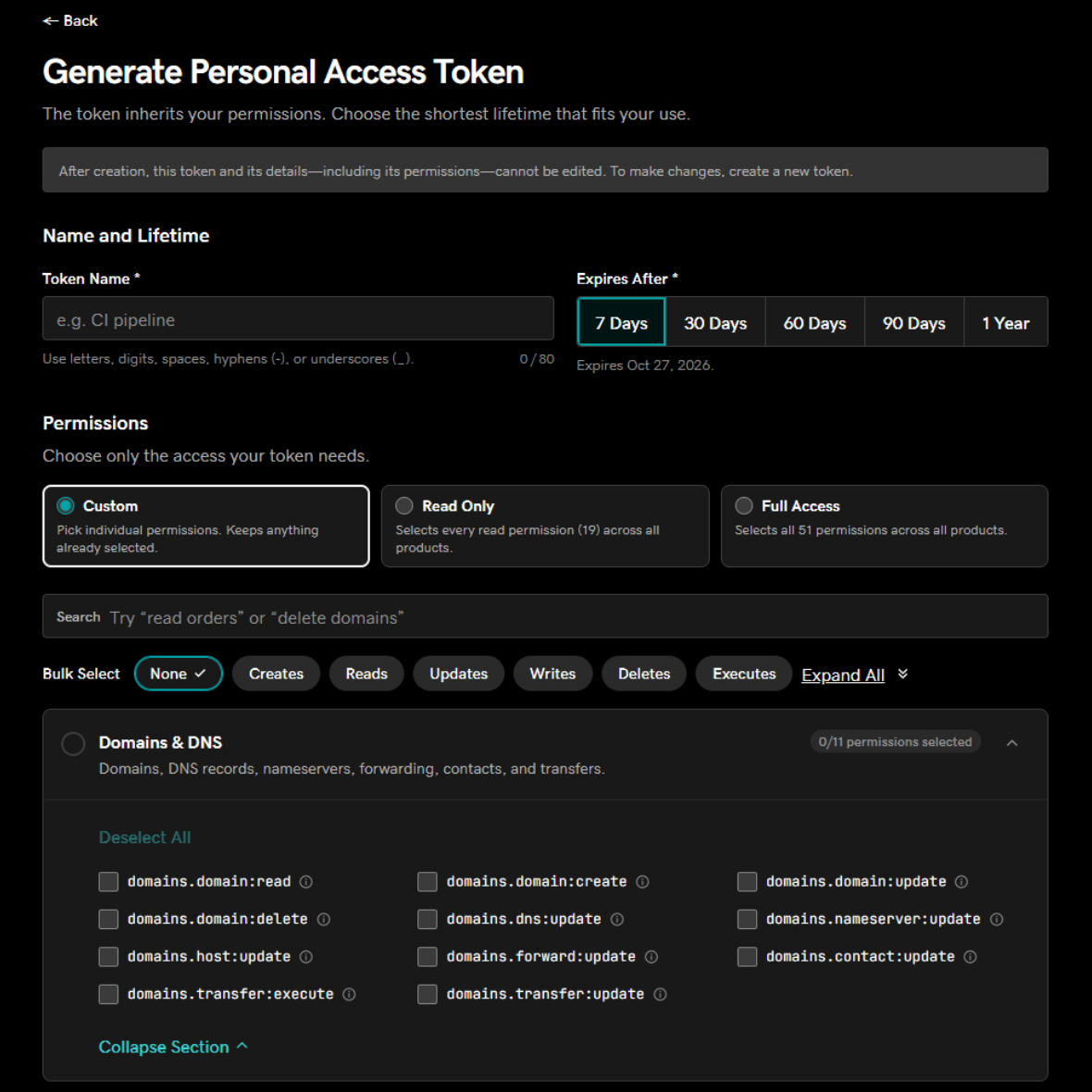
domains.domain:read under Domains & DNS; the other ten in that section can change or move a domain.Within a minute or two the GoDaddy integration page lists the account’s domains, and from then on it is read every six hours. Sync now reads it again straight away — after renewing a domain or changing its auto-renew, for instance.
What a token can see
Only the account it was made in. That is every domain you registered yourself. A client’s domains in their own GoDaddy account are not in it, and neither are domains bought through a GoDaddy reseller’s storefront, whose registration record names Wild West Domains as the registrar. Those show No account on the Domains page. GoDaddy does not document whether its delegate access reaches tokens, so a client account delegated to you may not be visible either. One GoDaddy account can be connected per organization.
The list includes the account’s history: domains cancelled, let lapse or transferred away. Those show as Not held and never raise anything.
What it reads, and what it never asks for
- One request: the account’s domain list, every six hours.
- For each domain, its status, whether auto-renew is on, its expiry date, the last day it can be renewed, and whether it is locked.
- Never transfer authorization codes or contact details. GoDaddy will return both on the same request if asked. CheckRoost does not ask, and discards them if they arrive anyway: a transfer code is the key to taking a domain.
- Never a change. No renewals, purchases, transfers or settings. A token with only domains.domain:read could not make one if it tried.
Classic API keys are refused
If it stops working
When a token expires or is revoked, the next read fails and the GoDaddy integration page shows GoDaddy’s reason. Two days after the last good read, auto-renew stops being shown anywhere else, so an old “On” never stands in for a setting nobody is checking any more. Generate a new token and paste it with Replace key.
Disconnecting
Removes the token and everything the account reported. Monitors and their domain checks are untouched. Revoke the token at GoDaddy as well, from its menu on the Personal Access Tokens page: deleting CheckRoost’s copy does not cancel it.